
How to Broadcast Your Energetic Library Anywhere | Universal Remote Emitter | Dynamic Energy Field
₹5,999.00 Taxes included
Your Entire Energetic Library. One Remote. Anywhere.
Your Library Stays. Your Access Travels. Your Intention Remains in Control.
The Universal Remote Emitter | Dynamic Energy Field is designed as a portable access and management system for your personal energetic library.
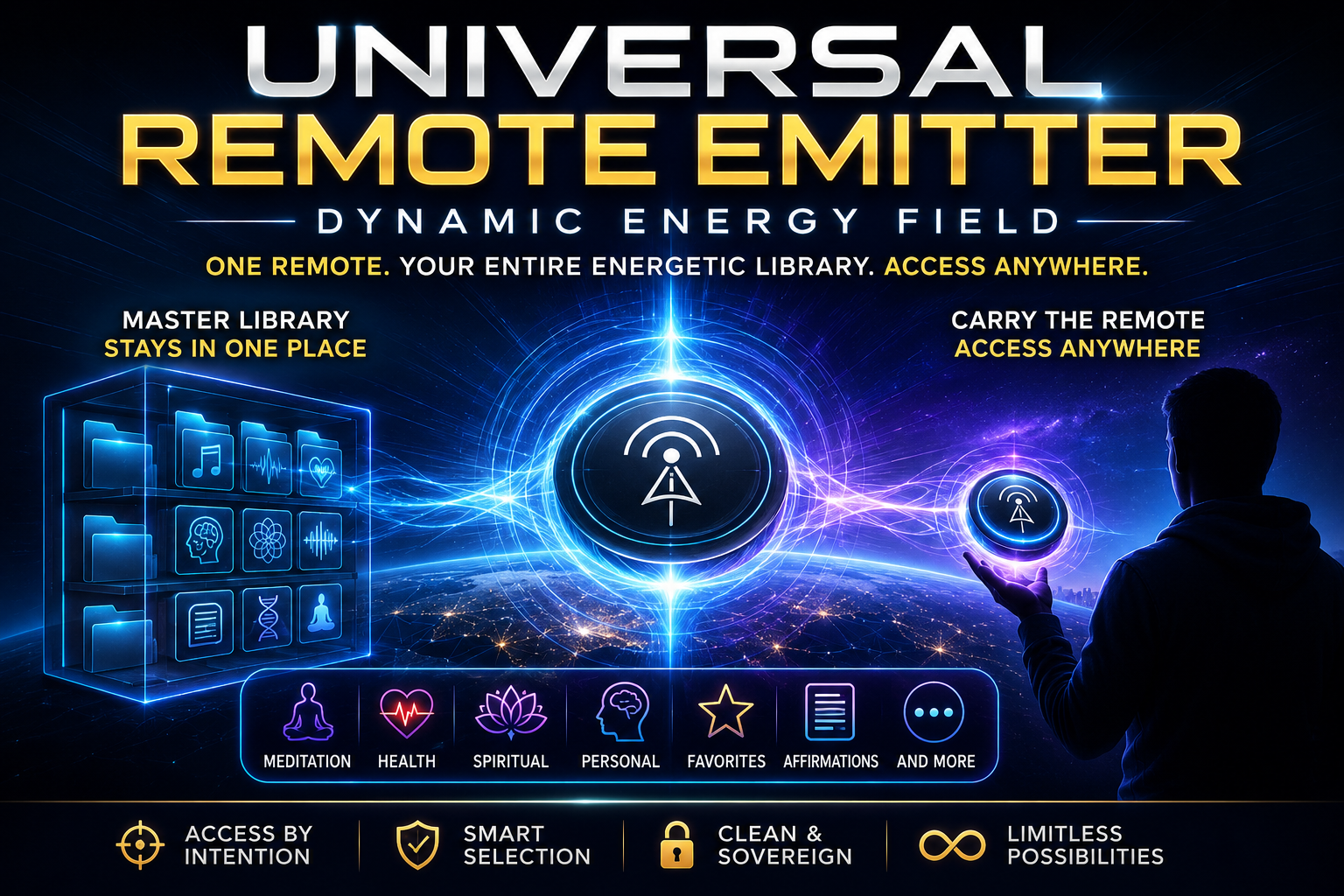
Instead of carrying hundreds of morphic fields, Dynamic Energy Fields, scalar audios, subliminals, mantras, meditation tracks, frequencies, written affirmations, intention statements, personal notes, and other energetic resources on your mobile device, you can maintain one organized Master Library on your computer, external drive, USB, or suitable storage location and carry only the Universal Remote Emitter with you.
The idea is simple:
Keep Your Library in One Place → Carry One Remote → Access by Intention
HOW THE SYSTEM WORKS
YOUR INTENTION↓
UNIVERSAL REMOTE
↓
INTELLIGENT COMMAND LAYER
↓
FIELD • FOLDER • LIBRARY • SMART MODE
↓
MASTER ANCHOR
↓
MASTER LIBRARY
↓
Meditation • Health • Spiritual • Affirmations • Personal • Favorites • More
Your Intention
Everything begins with you.
You decide whether you want to access a specific field, an entire folder or stack, your broader library, or allow Smart Mode to identify resources based on your current intention.
Universal Remote
Keep one copy of the Universal Remote Emitter on your phone, tablet, laptop, or other portable device.
This becomes your personal Remote Access Point.
Master Anchor
Place a second identical copy of the Universal Remote Emitter inside your Master Library.
This becomes the Master Anchor, serving as the reference point between your portable Remote and your organized energetic collection.
The Anchor copy does not require continuous playback.
Master Library
Your Master Library contains the energetic resources you want available through the system.
It may include:
Morphic Fields • Dynamic Energy Fields • Scalar Fields • Subliminals • Mantras • Frequencies • Meditation Audios • Binaural Beats • Written Affirmations • Intention Statements • Personal Creations • Resources From Other Creators
SIMPLE SETUP
1. Create Your Master Library
Create one dedicated folder on your computer, external drive, USB, or other suitable storage location.
2. Place the Master Anchor
Place one copy of the Universal Remote Emitter inside the Master Library.
This becomes your Anchor Copy.
3. Add Your Energetic Resources
Place the resources you want to access inside the Master Library.
You may organize them into folders and subfolders according to purpose, creator, intention, frequency of use, or any system that makes sense to you.
4. Carry Your Remote
Keep an identical copy of the Universal Remote Emitter on your mobile device.
Your Master Library stays where it is. Your access travels with you.
FOUR WAYS TO USE THE UNIVERSAL REMOTE
1. DIRECT FIELD MODE
Use Direct Field Mode when you already know exactly which resource you want.
Example Command:
“Activate Divine Glance.”
The Universal Remote is directed toward that specific resource within your Master Library.
Best for:
Specific fields • Individual audios • Written affirmations • Precise intentional work
2. FOLDER / STACK MODE
A folder can function as your ready-made energetic stack.
For example, your Sleep & Recovery folder might contain:
• Vagus Nerve support
• Deep Sleep
• Nervous System relaxation
• Subconscious calming
• Written sleep affirmation
• Recovery fields
Instead of selecting every resource separately, simply intend:
“Activate my Sleep & Recovery folder.”
You can organize your combinations once and access them whenever you need them.
Your folders become your personal energetic architecture.
3. LIBRARY MODE
Library Mode allows your broader Master Library to become available for the intention of your current session.
Instead of manually searching through hundreds of resources, you may use a broader instruction such as:
“Use my Master Library for today’s meditation.”
Library Mode is useful when you want broader access to your collection without manually selecting every individual resource.
4. SMART MODE
Let Your Intention Do the Sorting.
Smart Mode is designed for those moments when you know what you want to accomplish, but may not know which resources in your library are most appropriate.
Give your intention and allow Smart Mode to identify the most appropriate resources available within the permitted areas of your Master Library.
Examples:
“Select the most appropriate fields for today’s meditation.”
“Select the most suitable resources for restful sleep.”
“Choose the most appropriate resources for grounding.”
“Select the most appropriate affirmation from my library for today.”
“Select something appropriate from my library that I have not been using recently.”
Instead of trying to remember every resource you own, your intention becomes the selection cue.
5. Optional Instruction File
If you prefer not to give repeated mental or verbal instructions throughout the day, you may create a simple text file in the same folder as your portable Universal Remote.
Name the file:
URE_instructions.txt or any document format
This file may contain your personal standing instructions, preferences, exclusions, priorities, or time-based intentions for the Universal Remote.
For example:
Morning
Prioritize meditation, grounding, clarity, and focused energy.
Afternoon
Prioritize productivity, concentration, balance, and appropriate support from my permitted library.
Evening
Prioritize relaxation, nervous system calming, spiritual reflection, and preparation for restful sleep.
General Instructions
Use only resources permitted within my Master Library.
Do not access anything placed inside the Do Not Access / Exclusion folder.
My direct mental or verbal instructions always take priority over this instruction file.
Use only the minimum number of resources appropriate for the stated intention.
Stop or exclude any resource that is not appropriate for the current session.
Important
The URE_instructions.txt file is optional.
It is intended to function as a written intention and preference reference within the energetic framework of the Universal Remote Emitter. It is not a software configuration file and does not technically control, execute, schedule, or transmit digital files.
Your direct conscious instruction remains the highest authority at all times.
ORGANIZE YOUR LIBRARY YOUR WAY
There is no required folder structure.
A simple Master Library could look like this:
MASTER LIBRARY
- Meditation
- Spiritual Practice
- Sleep & Recovery
- Health & Wellbeing
- Focus & Productivity
- Prosperity
- Protection & Grounding
- Written Affirmations
- Favorites
- Experimental
- Do Not Access / Exclusion
Favorites
Use the Favorites folder for resources you access frequently.
You may include your most-used fields, affirmations, meditation resources, or personal combinations.
Do Not Access / Exclusion Folder
Use this folder for resources that should remain excluded from Library Mode and Smart Mode unless you specifically request them.
This may include:
• Resources you are temporarily not using
• Strong fields you prefer to activate manually
• Experimental files
• Resources reserved for specific practices
• Files you want stored but not automatically selected
This provides an additional layer of intentional control.
DYNAMIC LIBRARY STRUCTURE
Your energetic library will naturally evolve.
You may:
Add → Remove → Rename → Reorganize → Move → Create New Folders → Change Your Stacks
The Universal Remote Emitter is designed to work with the current organization of your anchored Master Library, allowing your system to evolve as your collection changes.
You do not need to rebuild your entire library every time you add or reorganize a resource.
CREATOR-AGNOSTIC ACCESS
Your Library. Your Choice.
The Universal Remote Emitter is designed around your personal energetic library, rather than restricting you to one creator or one ecosystem.
Your Master Library may contain resources from Self to Soul Creations as well as other creators you personally trust.
The purpose is not to replace the energetic tools you already own.
The purpose is to provide a simpler, more organized, and more portable way to work with the collection you have already built.
CLEAN ENERGETIC GATEWAY
The Universal Remote Emitter is designed around one central principle:
You Remain the Governing Authority of Every Session.
Its operating framework is based on five principles:
CONSENT
Only intentionally authorized access is intended.
COMPATIBILITY
Smart Mode is designed to prioritize resources appropriate to your stated intention.
INTEGRITY
Each energetic resource remains distinct rather than becoming part of an uncontrolled mixture.
BOUNDARIES
Excluded resources and folders remain outside the active session unless directly requested.
USER AUTHORITY
Your direct instruction always takes priority over automated or Smart Mode selection.
SOVEREIGNTY SHIELD
The Universal Remote Emitter also incorporates a Sovereignty Shield, designed to support a clean and intentional energetic environment while filtering unwanted, intrusive, conflicting, or non-consensual energetic influence.
The governing principle remains:
Your Energy. Your Library. Your Authority.
SIMPLE COMMAND SYSTEM
Complicated commands are not required. Clear intention is the key.
Activate a Field:
“Activate Divine Glance.”
Activate a Folder:
“Activate my Meditation folder.”
Activate a Stack:
“Activate my Morning Stack.”
Smart Selection:
“Select the most appropriate resources for this meditation.”
Select an Affirmation:
“Choose the most appropriate affirmation from my library for today.”
Add Support:
“Add appropriate grounding support.”
Exclude:
“Do not use my Prosperity folder during this session.”
Restrict Smart Mode:
“Use only my Meditation and Spiritual Practice folders.”
Prioritize:
“Prioritize meditation and grounding.”
Pause:
“Pause the current session.”
Resume:
“Resume.”
Deactivate:
“Deactivate Divine Glance.”
Stop Everything:
“Universal Remote, Stop All.”
UNIVERSAL STOP & RESET
For complete session control, one simple instruction can be used:
“UNIVERSAL REMOTE, STOP ALL.”
This command is intended to:
• End the active session
• Stop current selections
• End Folder Mode or Smart Mode
• Clear temporary session instructions
• Clear temporary priorities and exclusions
• Return the Universal Remote to a neutral state
WHY USE THE UNIVERSAL REMOTE EMITTER?
As energetic libraries grow, four common challenges appear.
STORAGE
Hundreds of energetic files can consume significant mobile storage.
ORGANIZATION
Large collections can become increasingly difficult to navigate.
DECISION FATIGUE
You may own many useful resources but still struggle to decide which one to use.
PORTABILITY
Your complete collection may remain on your computer or external drive when you want access somewhere else.
The Universal Remote Emitter brings these elements into one simple system:
MASTER LIBRARY
↓
MASTER ANCHOR
↓
PORTABLE UNIVERSAL REMOTE
↓
YOUR INTENTION
↓
FIELD • FOLDER • LIBRARY • SMART SELECTION
THE CORE PHILOSOPHY
PORTABILITY
Your Library stays. Your access travels.
ORGANIZATION
Your folders become your personal energetic architecture.
INTENTION
Your intention becomes the command.
INTELLIGENCE
Smart Mode helps simplify selection from a large energetic library.
SOVEREIGNTY
You remain in control of every session.
Disclaimer
The Universal Remote Emitter | Dynamic Energy Field is offered solely as a spiritual, meditation, and personal energetic practice tool.
It is not a medical device, diagnostic tool, therapy, or substitute for professional medical, psychological, legal, or other qualified advice or treatment. No specific physical, emotional, spiritual, financial, or other outcome is guaranteed. Individual experiences may vary.
The Universal Remote Emitter is based on an intention-based energetic framework. It does not function as conventional wireless technology, cloud synchronization, remote file access, data transfer, or computer software, and it does not technically open or stream files stored on another device.
Users are responsible for selecting, organizing, and using their own Master Library. Self to Soul Creations does not control, verify, endorse, or accept responsibility for third-party energetic fields, subliminals, affirmations, frequencies, audios, or other materials added by the user. Only include resources from creators and sources you personally trust.
Written affirmations, personal notes, mantras, prayers, and other text-based resources should be used consciously and intentionally. Do not include content that you do not wish to incorporate into your personal practice.
The Sovereignty Shield, Smart Mode, compatibility, energetic selection, and related functions described for this product refer to the intended energetic design of the field and should not be interpreted as scientifically established technological or medical functions.
By using this product, you acknowledge that you are doing so voluntarily, according to your own judgment, beliefs, intentions, and personal responsibility.
For meditation and personal spiritual practice only.
FREQUENTLY ASKED QUESTIONS
How many resources should I keep in one folder?
For practical organization, approximately 10 to 30 resources per general folder is a useful guideline.
You may keep more, but very large folders can become harder to understand and manage.
If a category becomes large, divide it into subfolders.
Example:
Health & Wellbeing
→ Cardiovascular
→ Nervous System
→ Digestive Health
→ Metabolic Support
→ Recovery
The goal is not to create the largest folder possible. The goal is to maintain clarity.
Is there a maximum number of resources in the Master Library?
There is no specific organizational limit built into the concept of the Universal Remote Emitter.
A Master Library may contain hundreds of resources if it is clearly organized.
Organization is more important than total file count.
Can I add written affirmations?
Yes.
Written affirmations may be included alongside energetic audios and other resources.
You may include:
• Written affirmations
• Intention statements
• Personal declarations
• Mantras
• Prayer text
• Visualization scripts
• Personal spiritual notes
Give each file a clear and descriptive name.
Examples:
“Confidence & Self-Worth Affirmations”
“Morning Gratitude Affirmations”
“Deep Sleep Intention”
“Prosperity Declaration”
Can written affirmations have their own folder?
Yes.
A dedicated Written Affirmations folder is recommended if you use them frequently.
You may also place affirmations directly inside relevant folders.
For example, your Sleep & Recovery folder could contain both energetic resources and a written sleep affirmation.
Can I use resources from different creators?
Yes.
The Universal Remote Emitter is designed to be creator-agnostic.
You may organize resources from Self to Soul Creations together with resources from other creators you personally trust.
If you are uncertain about combining particular resources, keep them in separate folders and use them independently.
Should I put everything into one large folder?
No.
A single folder containing hundreds of unrelated resources can make intentional selection less clear.
It is better to organize resources into meaningful categories such as:
Meditation
Health
Spiritual Practice
Sleep
Focus
Prosperity
Protection
Affirmations
Favorites
Can I create folders inside folders?
Yes.
Subfolders are recommended for larger categories.
For example:
Spiritual Practice
→ Meditation
→ Guru Practice
→ Mantras
→ Consciousness
→ Written Affirmations
This keeps large libraries easier to understand and navigate.
How should I name my files?
Use clear and descriptive names.
Avoid vague names such as:
“Track 1”
“New Audio”
“Final Version”
“Field ABC”
Instead use names such as:
“Deep Sleep”
“Vagus Nerve Support”
“Morning Meditation”
“Grounding & Stability”
“Self-Worth Affirmations”
Clear naming supports more precise Direct Mode use and better overall organization.
Can I add, rename, move, or remove resources later?
Yes.
Your Master Library is intended to evolve with you.
You may:
Add → Remove → Rename → Reorganize → Move → Create New Folders
There is no need to create a completely new Master Library every time your collection changes.
What is the Favorites folder for?
The Favorites folder is for resources you use most often.
For example:
“Activate my Favorites.”
or:
“Select the most appropriate resource from my Favorites for meditation.”
Favorites can be especially useful when your Master Library becomes large.
What is the Do Not Access / Exclusion folder?
This folder is used for resources you do not want automatically considered during Library Mode or Smart Mode.
A resource placed here remains excluded unless you specifically request it.
This gives you an additional boundary within your Master Library.
Can I create my own stacks?
Yes.
One of the major advantages of Folder Mode is that a folder itself can become your personal stack.
For example:
Morning Stack
• Meditation
• Grounding
• Focus
• Written affirmation
• Productivity support
Then simply use:
“Activate my Morning Stack.”
How many resources should I place in a stack?
For a focused manually curated stack, approximately 3 to 10 resources is a practical guideline.
A smaller, clearly focused stack is usually easier to understand than a large collection of unrelated resources.
Keep each stack aligned with one primary intention.
Can Smart Mode use written affirmations?
Yes, if written affirmations are located within areas of the Master Library available to Smart Mode.
For example:
“Select the most appropriate resources and affirmations for today’s meditation.”
or:
“Choose the most appropriate affirmation from my library for today.”
You may also direct Smart Mode only to the Written Affirmations folder.
Can I restrict Smart Mode to one folder?
Yes.
For example:
“From my Health & Wellbeing folder, select the most appropriate resources for today’s session.”
This combines Smart Mode with the boundaries of a specific category.
Can I temporarily exclude a folder?
Yes.
For example:
“Do not use my Prosperity folder during this session.”
or:
“Use only Meditation and Spiritual Practice during this session.”
Temporary exclusions allow you to narrow the available resource pool without reorganizing your Master Library.
Does the Master Anchor need to be played?
No continuous playback is required for the Master Anchor.
Its purpose within the system is to serve as the reference point for your organized Master Library.
Your portable copy functions as the Remote.
Does my Remote device need to contain all my files?
No.
That is one of the central purposes of the Universal Remote Emitter.
Your complete Master Library can remain in its primary storage location while you carry only the Remote copy on your portable device.
Your Library Stays. Your Access Travels.
Can I keep the Remote on more than one device?
Yes.
You may keep a Remote copy on personal devices you regularly use, such as your phone, tablet, or laptop.
For simplicity, however, it is recommended to maintain one clearly defined Master Library rather than several competing Master Libraries.
What happens if I forget the exact name of a resource?
You may use the intention or category instead.
For example:
“Select the most appropriate sleep resource from my library.”
or:
“Activate the grounding field I normally use.”
For precise Direct Field Mode selection, clear file naming remains recommended.
RECOMMENDED QUICK GUIDELINES
General Folder Size: Approximately 10 to 30 resources
Focused Stack Size: Approximately 3 to 10 resources
Subfolders: Recommended for larger categories
File Names: Keep clear and descriptive
Written Affirmations: Supported
Multiple Creators: Supported
Favorites Folder: Recommended
Do Not Access / Exclusion Folder: Recommended
Duplicate File Names: Avoid when possible
Master Library: Keep one primary organized structure
UNIVERSAL REMOTE EMITTER
STORE EVERYTHING. CARRY ONE REMOTE. ACCESS BY INTENTION.
You spent time building your energetic library.
The Universal Remote Emitter | Dynamic Energy Field is designed to help you access that collection more simply, intelligently, and intentionally without carrying the entire library on every device.
A Powerful Library Is Not the Largest Library. It Is the Clearest One.
Your Library Stays.
Your Access Travels.
Your Intention Remains in Control.
Your Library. Your Structure. Your Intention. Your Authority.